
Introduction
The core feature of the SuperSurv package is its ability
to combine multiple base survival learners using cross-validated
ensemble weights. This tutorial walks through preparing data, defining a
library of models, fitting the Super Learner, and generating predictions
for new patients.
1. Load Data & Prepare Matrices
We will use the built-in metabric dataset, extracting
the covariates and performing a standard 80/20 train-test split.
library(SuperSurv)
library(survival)

# Load built-in METABRIC data
data("metabric", package = "SuperSurv")

# Use a fixed teaching subset so the package vignette remains quick to rebuild.
# The full-data comparison used in the manuscript is provided separately in the
# replication materials.
set.seed(42)
example_idx <- sample(seq_len(nrow(metabric)), 400)
metabric_example <- metabric[example_idx, ]
n_total <- nrow(metabric_example)
train_idx <- sample(1:n_total, 0.8 * n_total)

train <- metabric_example[train_idx, ]
test  <- metabric_example[-train_idx, ]

# Extract just the X covariates (assuming they are named x0, x1, etc.)
x_cols <- grep("^x", names(metabric), value = TRUE)
X_tr <- train[, x_cols]
X_te <- test[, x_cols]

# Define the prediction time grid (e.g., survival at 50, 100, 150, 200 months)
new.times <- c(50, 100, 150, 200)

common_control <- list(
  saveFitLibrary = TRUE,
  event.t.grid = seq(0, max(train$duration[train$event == 1]), length.out = 40),
  cens.t.grid = seq(0, max(train$duration[train$event == 0]), length.out = 40)
)
2. Define the Ensemble Library
We define a small library of parametric and tree-based survival models for a reproducible demonstration.
3. Train the SuperSurv Metalearner
Before we run the main SuperSurv engine, it is important
to understand its key parameters. The Super Learner algorithm relies on
cross-validation to assign weights to the base models, and it must model
both the event and the censoring mechanism to avoid biased
evaluations.
Here is the complete guide to the arguments you need to pass:
The Data Inputs
-
time: A numeric vector of the observed follow-up times for your training cohort. -
event: A numeric vector indicating the status at the observed time (typically1= event occurred,0= right-censored). -
X: Adata.frameor matrix containing only the predictor variables (covariates) for the training set. Do not include the time or event columns here! -
newdata: (Optional) Adata.frameof covariates for a validation or test set. If provided,SuperSurvwill immediately generate predictions for these patients during the training phase, saving you a step. -
new.times: A numeric vector defining the exact time points where you want survival probabilities predicted (e.g.,seq(50, 200, by = 25)).
The Model Libraries
-
event.library: A character vector of the base algorithms used to predict the actual survival outcome (e.g.,"surv.coxph","surv.rpart"). -
cens.library: The library used to estimate the censoring mechanism over time.SuperSurvuses these predictions to calculate Inverse Probability of Censoring Weights (IPCW). You can use the exact same library as your event models, or a simpler one.
The Meta-Learner & Tuning
-
metalearner: The objective used to calculate the final ensemble weights.SuperSurvoffers two supported approaches:-
"brier"(default): minimizes the IPCW pseudo-outcome squared criterion described in the package methodology. -
"logloss": minimizes a two-term IPCW log-loss. It penalizes overconfident incorrect probabilities more strongly than squared loss, but neither objective is expected to dominate in every dataset.
-
-
nFolds: The number of cross-validation folds used to train the meta-learner.V = 5orV = 10is standard. This cross-validation is what prevents the ensemble from overfitting to the base learners. -
control = list(saveFitLibrary = TRUE): This tells the engine to save the fitted base learners into the final object. This is required if you want to use thepredict()method on new patients later. -
verbose: Set toTRUEto print progress messages to the console. Highly recommended for large datasets or complex libraries so you can track the cross-validation progress.
Let’s fit two models with verbose = FALSE to see how the
meta-learner choice affects the final ensemble weights.
# Fit 1: Least Squares Meta-learner
set.seed(2026)
fit_ls <- SuperSurv(
  time = train$duration,
  event = train$event,
  X = X_tr,
  newdata = X_te,                 # Predict on the test set immediately
  new.times = new.times,       # Our evaluation time grid
  event.library = my_library,
  cens.library = my_library,
  metalearner = "brier",
  control = common_control,
  verbose = FALSE,
  selection = "ensemble",
  nFolds = 3
)

# Fit 2: Negative Log-Likelihood Meta-learner
set.seed(2026) # Reuse the same cross-validation folds for a fair comparison.
fit_nll <- SuperSurv(
  time = train$duration,
  event = train$event,
  X = X_tr,
  newdata = X_te,
  new.times = new.times,
  event.library = my_library,
  cens.library = my_library,
  metalearner = "logloss",       # Swap to nloglik
  control = common_control,
  verbose = FALSE,
  selection = "ensemble",
  nFolds = 3
)
4. Package Object Interface
SuperSurv fits behave like ordinary R model objects. Use
the print and summary methods for a quick overview, and use accessors
for common fitted-model details.
fit_ls
#> SuperSurv fit
#>   Selection: ensemble
#>   Event learners: 3
#>   Censoring learners: 3
#>   Predictions: 80 observations x 4 times
#>   Evaluation times: 4 values from 50 to 200
#>   Nonzero event weights:
#> surv.weibull_screen.all   surv.coxph_screen.all   surv.rpart_screen.all
#>                  0.5387                  0.3600                  0.1013

summary(fit_ls)
#> Summary of SuperSurv fit
#>   Selection: ensemble
#>
#> Call:
#> SuperSurv(time = train$duration, event = train$event, X = X_tr,
#>     newdata = X_te, new.times = new.times, event.library = my_library,
#>     cens.library = my_library, verbose = FALSE, control = common_control,
#>     metalearner = "brier", selection = "ensemble", nFolds = 3)
#>
#> Event ensemble:
#>                  learner weight   risk status
#>  surv.weibull_screen.all 0.5387 0.8656     ok
#>    surv.coxph_screen.all 0.3600 0.8656     ok
#>    surv.rpart_screen.all 0.1013 0.8981     ok
#>
#> Censoring ensemble:
#>                  learner weight   risk status
#>  surv.weibull_screen.all 0.6631 0.8174     ok
#>    surv.coxph_screen.all 0.0947 0.8181     ok
#>    surv.rpart_screen.all 0.2423 0.8303     ok
#>
#> Predictions: 80 observations x 4 times
#> Evaluation times: 4 values from 50 to 200
#> Elapsed time (seconds):
#> everything      train    predict
#>      5.095      4.987      0.106

event_weights(fit_ls)
#>   surv.coxph_screen.all surv.weibull_screen.all   surv.rpart_screen.all
#>               0.3600037               0.5386712               0.1013251

learner_names(fit_ls)
#> [1] "surv.coxph_screen.all"   "surv.weibull_screen.all"
#> [3] "surv.rpart_screen.all"

eval_times(fit_ls)
#> [1]  50 100 150 200

selected_variables(fit_ls, learner = 1)
#> [1] "x0" "x1" "x2" "x3" "x4" "x5" "x6" "x7" "x8"
5. Compare the Fitting Objectives
With selection = "ensemble", the meta-learner estimates
a convex combination of the candidate predictions under the selected
cross-validated objective. The two objectives can produce different
weights.
First inspect the fitted weights and algorithm summaries.
cat("\n--- LEAST SQUARES METALEARNER ---\n")
#>
#> --- LEAST SQUARES METALEARNER ---
summary(fit_ls)
#> Summary of SuperSurv fit
#>   Selection: ensemble
#>
#> Call:
#> SuperSurv(time = train$duration, event = train$event, X = X_tr,
#>     newdata = X_te, new.times = new.times, event.library = my_library,
#>     cens.library = my_library, verbose = FALSE, control = common_control,
#>     metalearner = "brier", selection = "ensemble", nFolds = 3)
#>
#> Event ensemble:
#>                  learner weight   risk status
#>  surv.weibull_screen.all 0.5387 0.8656     ok
#>    surv.coxph_screen.all 0.3600 0.8656     ok
#>    surv.rpart_screen.all 0.1013 0.8981     ok
#>
#> Censoring ensemble:
#>                  learner weight   risk status
#>  surv.weibull_screen.all 0.6631 0.8174     ok
#>    surv.coxph_screen.all 0.0947 0.8181     ok
#>    surv.rpart_screen.all 0.2423 0.8303     ok
#>
#> Predictions: 80 observations x 4 times
#> Evaluation times: 4 values from 50 to 200
#> Elapsed time (seconds):
#> everything      train    predict
#>      5.095      4.987      0.106

cat("\n--- NLOGLIK METALEARNER ---\n")
#>
#> --- NLOGLIK METALEARNER ---
summary(fit_nll)
#> Summary of SuperSurv fit
#>   Selection: ensemble
#>
#> Call:
#> SuperSurv(time = train$duration, event = train$event, X = X_tr,
#>     newdata = X_te, new.times = new.times, event.library = my_library,
#>     cens.library = my_library, verbose = FALSE, control = common_control,
#>     metalearner = "logloss", selection = "ensemble", nFolds = 3)
#>
#> Event ensemble:
#>                  learner weight   risk status
#>  surv.weibull_screen.all 0.6619 0.5515     ok
#>    surv.coxph_screen.all 0.3358 0.5541     ok
#>    surv.rpart_screen.all 0.0023 0.7276     ok
#>
#> Censoring ensemble:
#>                  learner weight   risk status
#>  surv.weibull_screen.all 0.7401 0.8510     ok
#>    surv.coxph_screen.all 0.0154 0.8519     ok
#>    surv.rpart_screen.all 0.2445 0.8639     ok
#>
#> Predictions: 80 observations x 4 times
#> Evaluation times: 4 values from 50 to 200
#> Elapsed time (seconds):
#> everything      train    predict
#>     76.463     76.367      0.095
Then evaluate both fitted ensembles on the same held-out observations using both IPCW Brier score and IPCW log-loss. This comparison illustrates the objectives without assuming in advance that one must perform better.
benchmark_ls <- eval_benchmark(
  fit_ls, X_te, test$duration, test$event, new.times
)
benchmark_nll <- eval_benchmark(
  fit_nll, X_te, test$duration, test$event, new.times
)

objective_comparison <- rbind(
  transform(
    benchmark_ls$summary[benchmark_ls$summary$Model == "SuperSurv_Ensemble", ],
    Fitting_Objective = "Brier"
  ),
  transform(
    benchmark_nll$summary[benchmark_nll$summary$Model == "SuperSurv_Ensemble", ],
    Fitting_Objective = "Log-loss"
  )
)
objective_comparison[, c("Fitting_Objective", "IBS", "IPCW_LogLoss", "Uno_C", "iAUC")]
#>   Fitting_Objective       IBS IPCW_LogLoss     Uno_C      iAUC
#> 1             Brier 0.2062459    0.5970542 0.6163364 0.6616964
#> 2          Log-loss 0.2084490    0.6021272 0.6134644 0.6553774
event_weights(fit) reports each learner’s contribution
to the final convex combination. A zero weight means that the learner
does not contribute to that fitted ensemble. The held-out table, rather
than the training objective alone, should guide interpretation of
predictive performance.
6. Generating Predictions on New Data
If you passed newdata during the training phase,
SuperSurv already calculated the predictions for your test
set. However, in a real-world clinical setting, you will often train the
model once and then predict on brand new patients months later.
Because we set control = list(saveFitLibrary = TRUE)
during training, we can use the standard R predict()
method.
# Select 3 brand new patients from our test set
new_patients <- X_te[1:6, ]

# Generate predictions using the Least Squares ensemble
ensemble_preds <- predict(
  object = fit_ls,
  newdata = new_patients,
  new.times = new.times,
  type = "event"
)

cat("\n--- PREDICTED SURVIVAL PROBABILITIES ---\n")
#>
#> --- PREDICTED SURVIVAL PROBABILITIES ---
final_matrix <- ensemble_preds
colnames(final_matrix) <- paste0("Time_", new.times)
rownames(final_matrix) <- paste0("Patient_", 1:6)

print(round(final_matrix, 4))
#>           Time_50 Time_100 Time_150 Time_200
#> Patient_1  0.6948   0.4158   0.2433   0.1430
#> Patient_2  0.6807   0.3997   0.2340   0.1423
#> Patient_3  0.7720   0.5369   0.3643   0.2414
#> Patient_4  0.9617   0.9093   0.8558   0.8017
#> Patient_5  0.8404   0.6558   0.5018   0.3769
#> Patient_6  0.9619   0.9132   0.8668   0.8217
Understanding the Output Matrix:
With type = "event", predict() returns the
event-survival probability matrix directly. * Rows
():
Represent individual patients. * Columns
():
Represent the specific time points we defined in new.times.
* Values: The estimated probability that the patient
will survive past that specific time point. As time increases
(moving left to right across a row), the survival probability naturally
decreases.
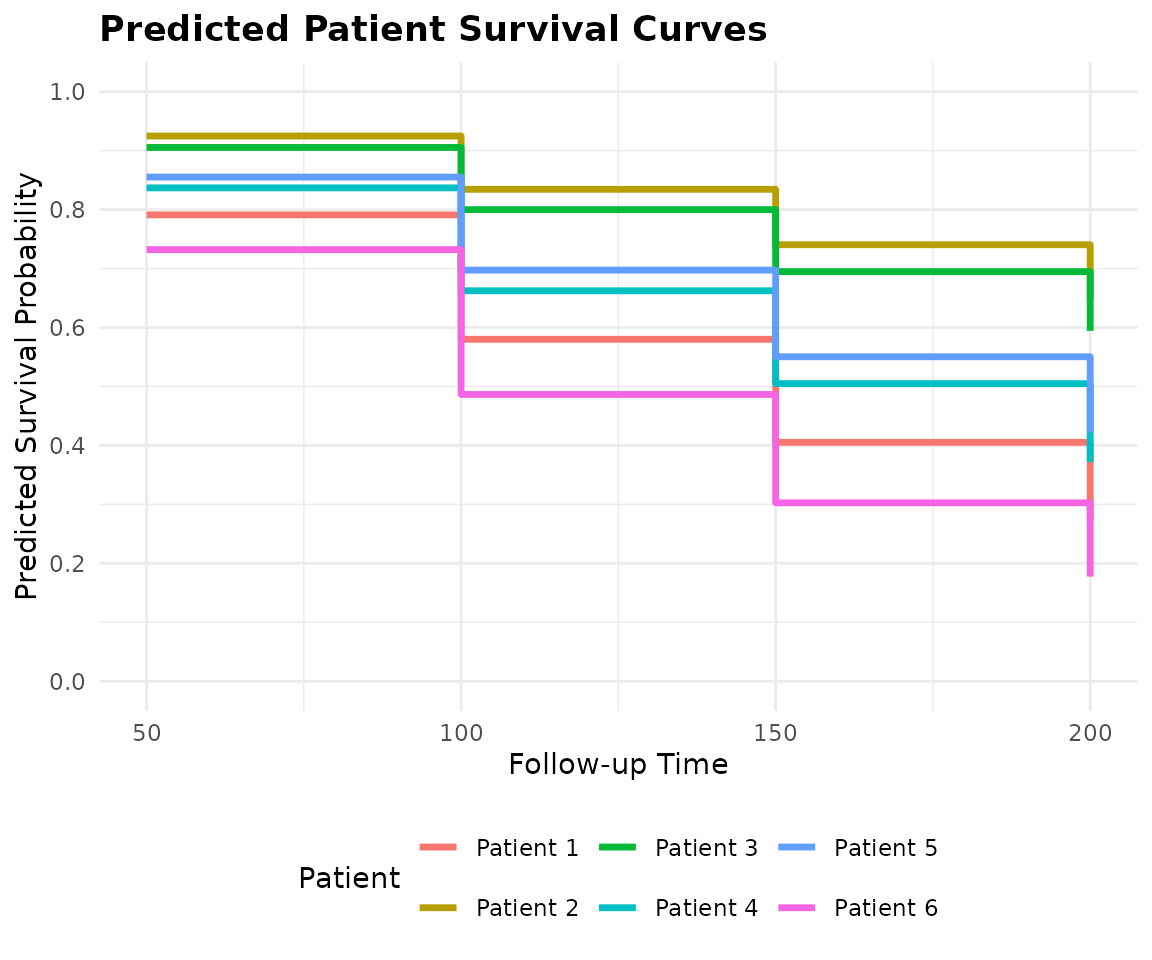
7. Visualizing Patient-Specific Predictions
While raw probability matrices () are perfect for downstream coding and performance benchmarking, they are difficult to interpret clinically. Doctors and researchers need to see the actual survival trajectories.
SuperSurv includes a built-in
plot_predict() function to effortlessly translate this
matrix into publication-ready survival curves for individual
patients.
This plotting example runs only when the optional
ggplot2 package is installed; fitting and numerical
prediction do not require it.
# Plot the predicted survival curves for our 3 new patients (Rows 1, 2, and 3)
plot_predict(
  preds = ensemble_preds,
  eval_times = new.times,
  patient_idx = 1:6
)
8. Next Steps
You now know how to prepare data, define a model library, choose a meta-learner, and generate patient-specific survival curves.
Before applying a model, evaluate the ensemble and its component learners on appropriately held-out data. Head to Tutorial 2: Model Performance & Benchmarking for numerical and graphical examples using time-dependent Brier score, AUC, and Uno’s C-index.