
08. Interpreting the Black Box with SHAP & survex
Source:vignettes/shap-explanations.Rmd
shap-explanations.RmdIntroduction
Flexible machine learning models can be difficult to interpret, so users may want summaries of how features contribute to a specific prediction.
SuperSurv provides an optional SHAP (SHapley
Additive exPlanations) workflow through
kernelshap. The explanation is computed for the fitted
ensemble prediction function and should be interpreted for the selected
prediction target and background sample.
This tutorial covers Global feature importance, Local (patient-level)
explanations, and Time-Dependent survival analysis using the
survex package.
1. Setup and Model Fitting
Let’s train a diverse Super Learner on our metabric
dataset.
library(SuperSurv)
library(survival)

data("metabric", package = "SuperSurv")
set.seed(42)

train_idx <- sample(1:nrow(metabric), 0.7 * nrow(metabric))
train <- metabric[train_idx, ]
test  <- metabric[-train_idx, ]

X_tr <- train[, grep("^x", names(metabric))]
X_te <- test[, grep("^x", names(metabric))]
new.times <- seq(50, 200, by = 25)
X_explain_subset <- X_te[1:10, ]
X_background_subset <- X_tr[1:30, ]

my_library <- c("surv.coxph", "surv.weibull")
if (has_rfsrc) {
  my_library <- c(my_library, "surv.rfsrc")
}

fit_sl <- SuperSurv(
  time = train$duration,
  event = train$event,
  X = X_tr,
  newdata = X_te,
  new.times = new.times,
  event.library = my_library,
  cens.library = c("surv.coxph"),
  verbose = FALSE,
  selection = "ensemble",
  nFolds = 3
)
2. Global Explanations (Kernel SHAP)
We explain event probability by 100 months,
1 - S(100 | X). An explicit eval_time keeps
every learner on the same probability scale. X_explain
contains the patients to explain; X_background defines the
reference population. All positive ensemble weights are retained, and
the stored survival prediction methods apply the same screening and
calibration used for ordinary prediction.
# Explain the ensemble event probability at one common horizon.
shap_vals <- explain_kernel(
  model = fit_sl,
  X_explain = X_explain_subset,
  X_background = X_background_subset,
  nsim = 20,
  eval_time = 100
)
Global Importance Bar Plot
Which features drive the ensemble’s mortality risk predictions across the entire cohort?
plot_global_importance(shap_vals, top_n = 5)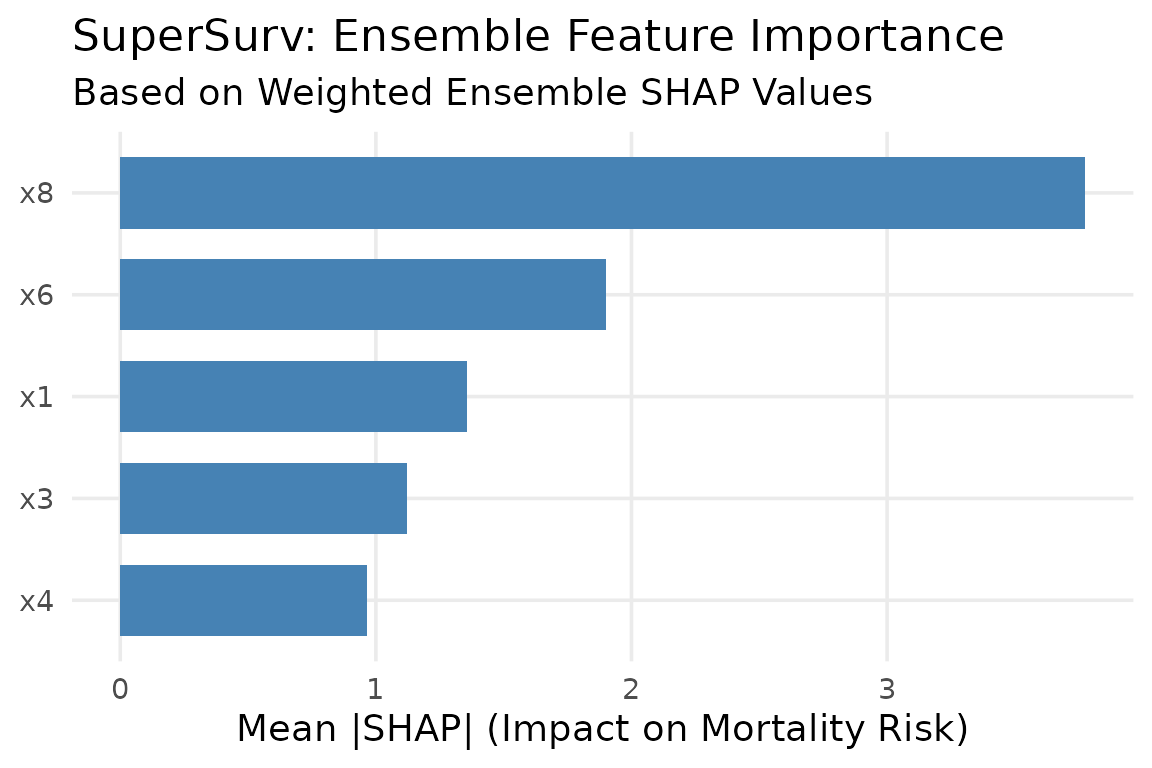
SHAP Beeswarm Summary Plot
The beeswarm plot is the gold standard for SHAP. It shows both the magnitude of a feature’s impact and the direction of its effect.
plot_beeswarm(shap_vals, data = X_explain_subset, top_n = 5)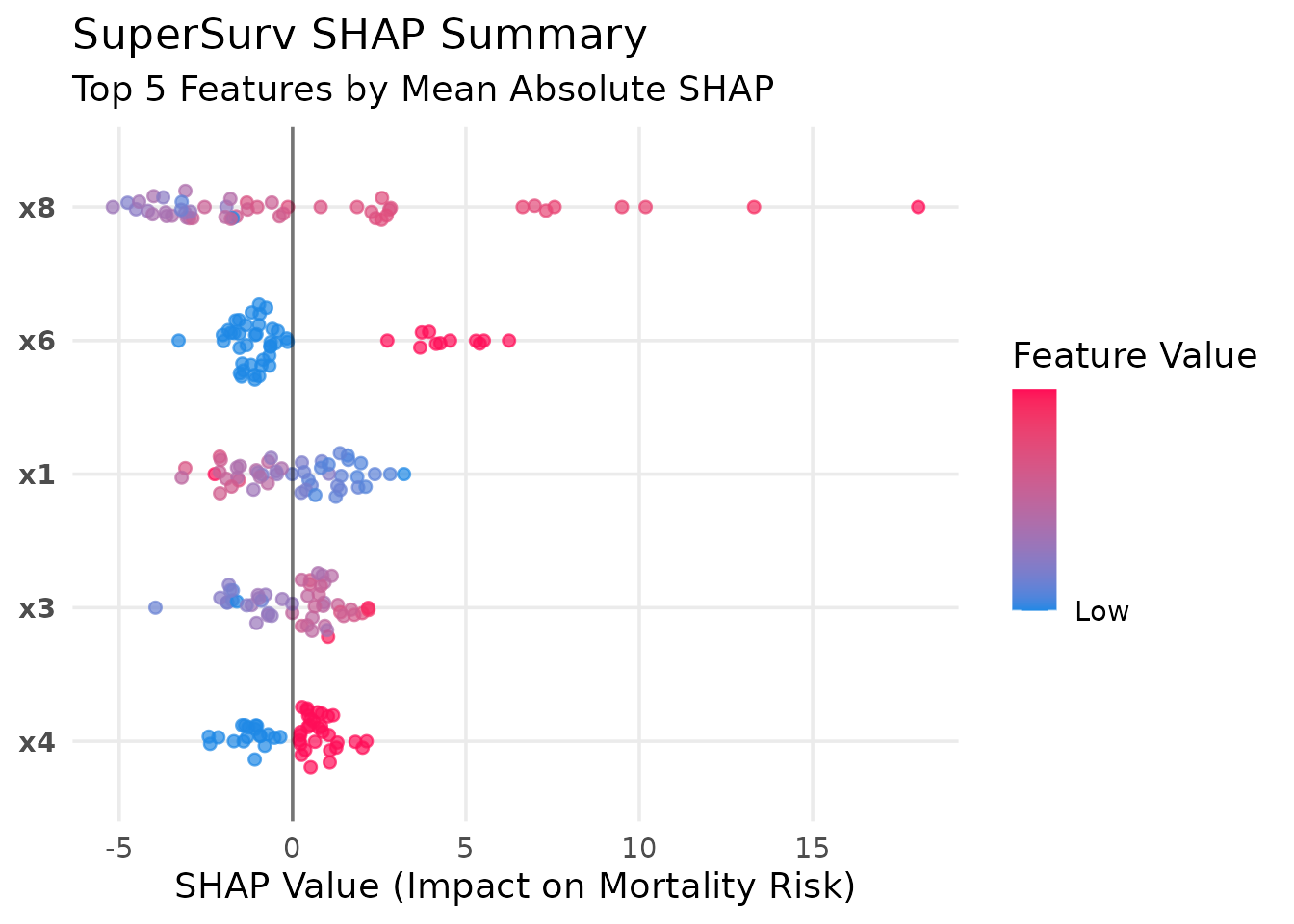 Interpretation: A red dot (high feature value) on the right side of
the vertical zero-line indicates that higher values of this biomarker
increase mortality risk.
Interpretation: A red dot (high feature value) on the right side of
the vertical zero-line indicates that higher values of this biomarker
increase mortality risk.
3. Local (Patient-Level) Explanations
In precision medicine, we often need to explain why a specific patient has a high risk score. The Waterfall plot breaks down the exact algorithmic logic for an individual.
# Explain Patient #1 from our test subset
plot_patient_waterfall(shap_vals, patient_index = 1, top_n = 5)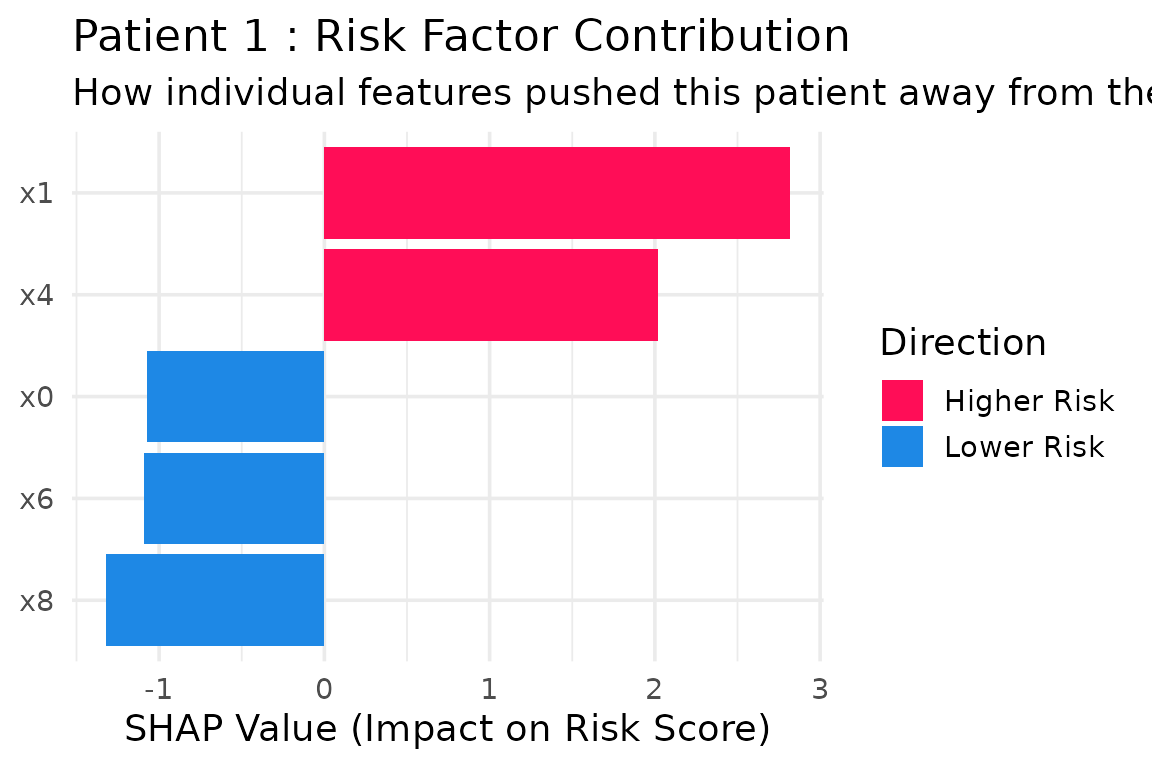
4. Feature Dependence Plots
Does a specific biomarker have a linear or non-linear relationship with mortality risk?
plot_dependence(shap_vals, data = X_explain_subset, feature_name = "x0")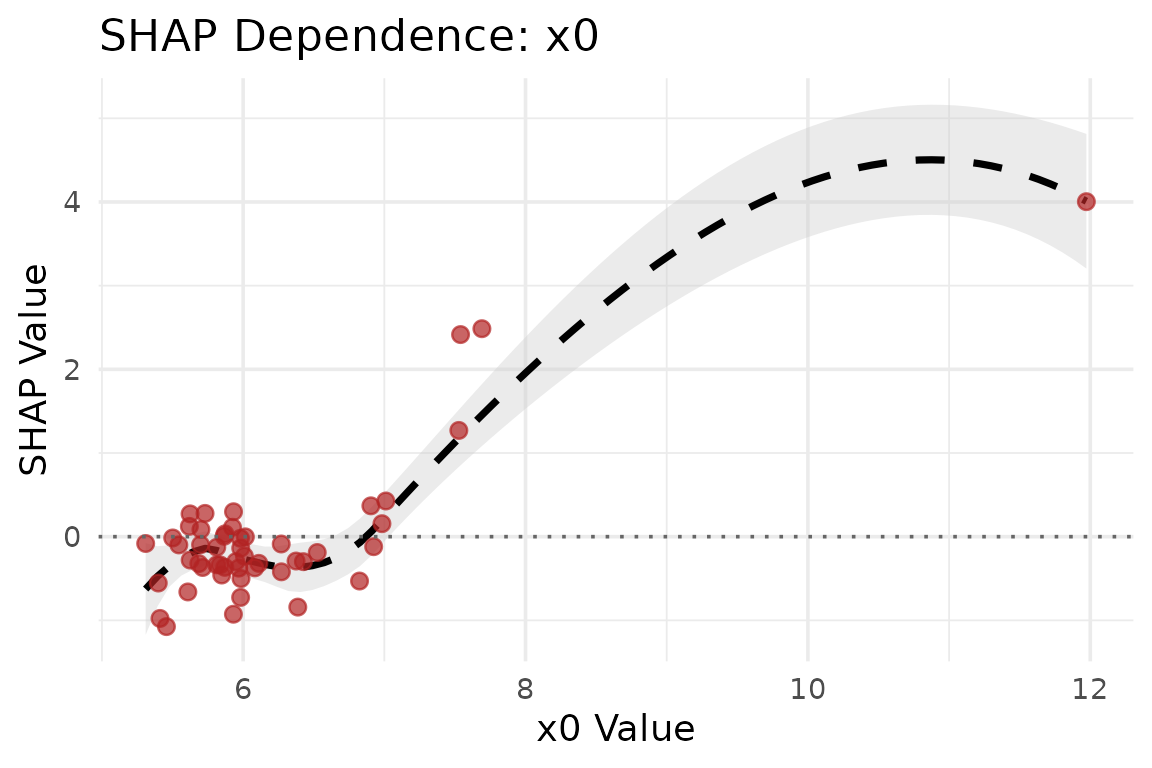
5. Patient Risk Trajectories (Survival Heatmap)
We can visualize patient trajectories over time using a survival
heatmap generated directly from SuperSurv predictions.
# Plot the survival trajectories for the first 50 test patients
plot_survival_heatmap(fit_sl, newdata = X_explain_subset, times = new.times)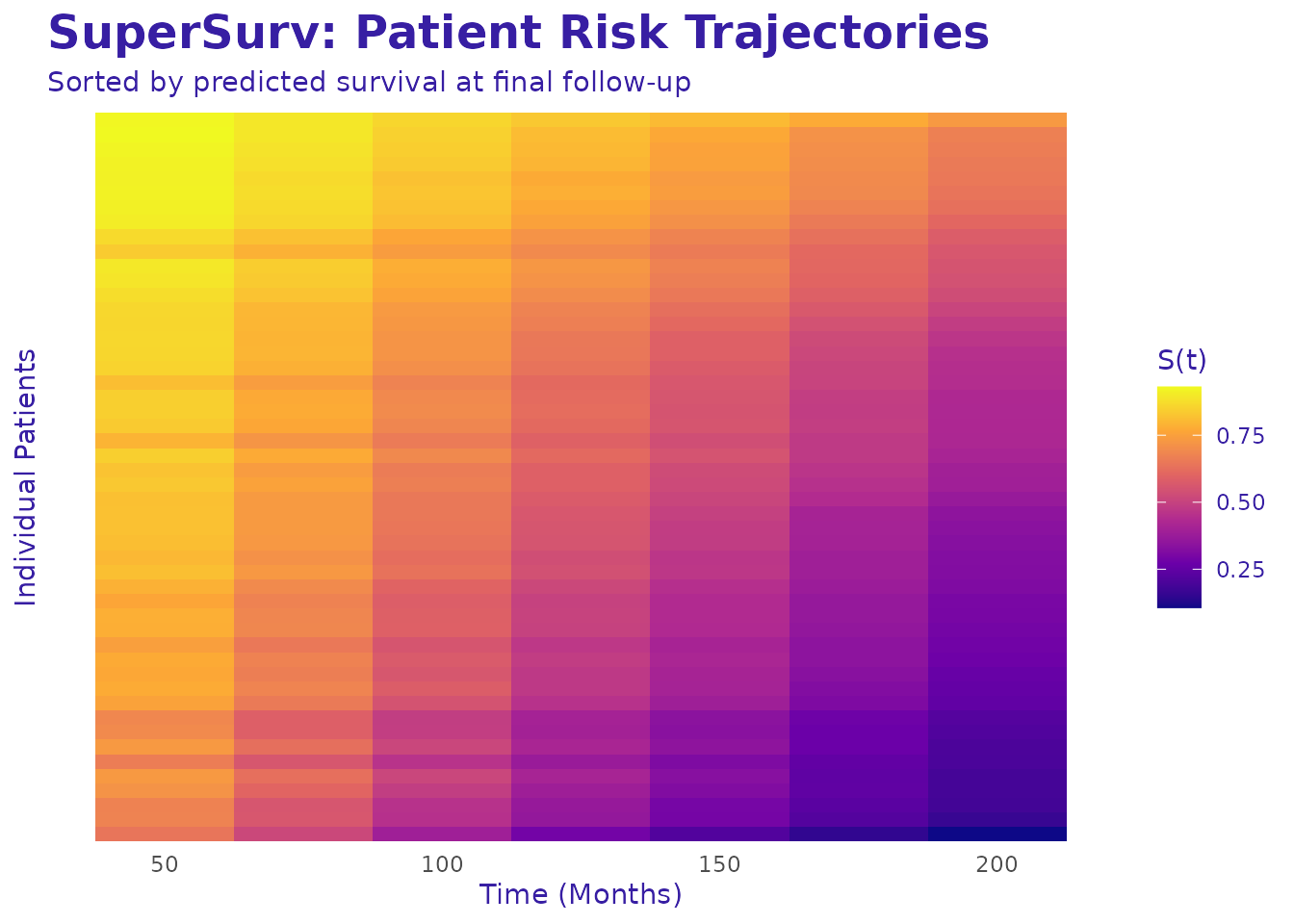 Interpretation: Patients at the top experience rapid drops in
survival probability (high risk), while patients at the bottom maintain
high survival probabilities.
Interpretation: Patients at the top experience rapid drops in
survival probability (high risk), while patients at the bottom maintain
high survival probabilities.
6. Time-Dependent Explanations (survex
Integration)
Traditional SHAP looks at an overall “risk score,” but survival analysis is fundamentally about time. A feature might be highly predictive of early mortality (Time = 50) but irrelevant for long-term survival (Time = 200).
SuperSurv natively bridges to the survex
package to evaluate dynamic feature importance across the entire
survival curve
.
library(survex)

# 1. Create the true survival object for the same explanation subset
y_explain <- survival::Surv(
  test$duration[seq_len(nrow(X_explain_subset))],
  test$event[seq_len(nrow(X_explain_subset))]
)

# 2. Build the survex explainer using our custom function
surv_explainer <- explain_survex(
  model = fit_sl,
  data = X_explain_subset,
  y = y_explain,
  times = new.times
)
Once the explainer is created, you have full access to the
survex ecosystem. Let’s look at three powerful
time-dependent visualizations.
The following specialist analyses are shown as code but are not
executed during the package vignette build because their runtime and
accepted prediction representations depend on the installed
survex release.
A. Dynamic Feature Importance
Which features are driving the model’s predictions at different clinical milestones?
# Calculate time-dependent model parts (permutation feature importance)
time_importance <- model_parts(surv_explainer)

# Plot the dynamic importance over time
plot(time_importance)
Interpretation: If a feature’s curve rises over time, it means that biomarker becomes more critical for predicting long-term survival.
B. Time-Dependent Partial Dependence Profiles
How does the value of a specific continuous feature (e.g.,
x0) change the average survival probability over time?
# Calculate the partial dependence profile for feature 'x0'
pdp_time <- model_profile(surv_explainer, variables = "x0")

plot(pdp_time)
Interpretation: This generates a 3D-like profile showing how
different values of x0 shift the entire survival
curve.
C. SurvSHAP(t): Local Explanations Over Time
Just like the Waterfall plot explains a static risk score, SurvSHAP(t) explains exactly how a specific patient’s features pushed their survival probability up or down at every single time point.
# Explain Patient #1 over time
patient_1_data <- X_explain_subset[1, , drop = FALSE]

# Calculate SurvSHAP(t)
survshap_t <- predict_parts(surv_explainer, new_observation = patient_1_data, type = "survshap")

plot(survshap_t)
Interpretation: The solid black line is the model’s average survival curve. The colored areas show how Patient 1’s specific covariates (like their specific age or tumor grade) dragged their personal survival curve above or below the average over time.
D. Ecosystem Compatibility: Global Model Performance
Because explain_survex() creates a standard explainer
object, you aren’t just limited to SHAP values. You can utilize the
entire survex ecosystem, including their built-in
performance metrics.
SuperSurv provides lightweight benchmark summaries
through eval_benchmark() and plot_benchmark().
The survex ecosystem offers complementary performance and
explanation tools:
# Optional packages can change their accepted prediction representation across
# releases, so keep this complementary illustration failure-tolerant.
survex_perf <- tryCatch(
  model_performance(surv_explainer),
  error = function(e) {
    message("The installed survex version could not evaluate this explainer: ",
            conditionMessage(e))
    NULL
  }
)

# Plot the Brier score and AUC curves
if (!is.null(survex_perf)) {
  plot(survex_perf)
}
The two interfaces may use different defaults, so comparisons should align the prediction horizon, censoring estimator, and metric definition.
These tools provide complementary views of fitted predictions. Their results should be interpreted in the context of the selected prediction target, background sample, censoring assumptions, and intended application.